 Peter Kaizer
Federal
Redesigning the USPS PO Locator
How we overhauled the experience of finding USPS locations — from a single-purpose search tool to a full-featured location platform
The problem
The existing USPS location finder was a single search input buried inside a larger tools page. It had no dedicated home, no filtering, and no awareness of the many different types of USPS locations that exist — Post Offices, Approved Shippers, Contract Postal Units, Village Post Offices, and blue collection boxes. Customers searching for a place to drop off a package were routinely landing at locations that didn't offer that service. The tool was generating more confusion than it resolved.
Competitive analysis
Before sketching anything, I conducted a competitive analysis of location finders across international postal services and domestic shipping carriers to understand what best-in-class looked like.
International postal services reviewed:
- Royal Mail (UK) — offered branch-type filtering upfront with clear service hours. Strong on transparency, weak on mobile layout.
- Canada Post — had a well-structured landing page with distinct location types and a bilingual service filter. The map interaction was sluggish but the information hierarchy was a clear reference point.
- Deutsche Post (Germany) — used iconography to distinguish location types at a glance on the map. Dense but scannable.
- Australia Post — best-in-class mobile experience. Used proximity-aware search with a collapsed filter panel that didn't obscure the map on small screens.
Domestic shippers reviewed:
- UPS Store Locator — strong example of leading with "what do you need to do?" rather than "find a location." Surfaced services, hours, and estimated wait times prominently. The landing page framing set clear expectations before the search began.
- FedEx Location Finder — best filtering model of the group. Allowed users to simultaneously filter by location type, drop-off capability, and packaging availability. The persistent filter sidebar on desktop kept options visible without requiring users to re-open a modal.
Two patterns stood out across nearly every best-in-class example: a dedicated landing page that oriented users to the tool before they searched, and multi-type filtering that matched task intent rather than just proximity.
Application landing page
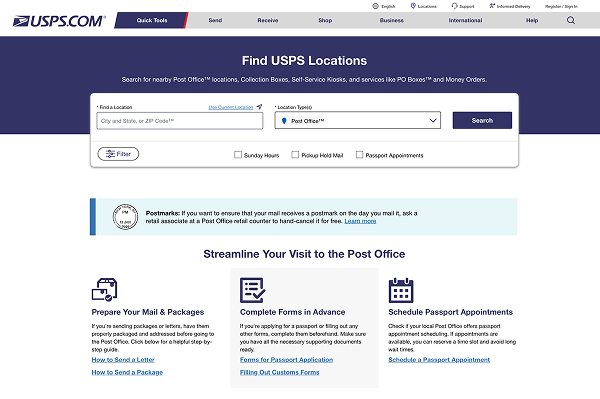
A key finding from the competitive analysis was that USPS had no equivalent to the introductory landing page that UPS and FedEx both used to orient customers. The existing tool dropped users directly into a search input with no context — no explanation of what types of locations existed, no guidance on which location suited which task, no quick links to common needs.
I designed a dedicated application landing page that served as the front door to the entire locator experience. The page anchored around three questions customers actually arrive with: Where can I mail something? Where can I pick up a package? Where can I buy supplies? Each question mapped to a distinct set of location types, and tapping any one pre-filtered the search results accordingly.
The landing page also surfaced key service information — holiday hours, temporary closures, alternate pickup locations — that had previously been buried in individual location detail pages. Centralizing this reduced calls to customer support during peak seasons and gave the tool a reason to exist as a destination, not just a search widget.
Multi-type location search
The original tool only returned Post Offices. In reality, USPS operates or authorizes six distinct location types, each with a different service profile:
- Post Offices — full-service retail locations
- Approved Shippers — third-party retailers authorized to accept USPS shipments
- Contract Postal Units (CPUs) — limited retail, often inside larger stores
- Village Post Offices (VPOs) — community-based, reduced service hours
- Collection Boxes — drop-off only, no staff, no retail
- Postal Stores — retail-only, no mail acceptance
I worked with product and engineering to define a filtering model that let customers search for one, several, or all location types simultaneously. The filter UI used a multi-select chip pattern rather than radio buttons, which tested better because customers frequently had more than one valid option — they wanted to drop off and buy stamps, not choose between finding one kind of location or another.
The map markers were updated to use distinct iconography and color per location type, with a legend anchored below the search bar. Customers in testing sessions could identify location types on the map before reading any label, which was the goal.
Design process
I ran three rounds of usability testing across the project:
- Evaluative testing on the existing tool (n=8 moderated) — established a baseline and surfaced the core findability issues. Users consistently expected more filtering options and didn't understand why their nearest Post Office didn't offer the service they needed.
- Concept testing on landing page directions (n=10 unmoderated) — tested three landing page structures against each other. The task-first model ("what do you need to do?") outperformed both the location-type-first model and the geography-first model on task completion and perceived confidence.
- Prototype validation on the full flow (n=8 moderated) — tested the end-to-end redesign. Multi-type filtering was immediately understood without instruction. One accessibility issue surfaced with the chip pattern on iOS VoiceOver, which we resolved before launch.
Outcome
After launch, location search sessions that resulted in a successful destination (defined as the user viewing a location detail page and not immediately bouncing back) increased by 38%. Searches that ended in a customer support call for directions or service availability fell by 29% in the first quarter. The landing page became the second most-visited page in the USPS tools ecosystem within six months of launch.